
CP Plus Intelli Serve - Download Ultemate App for After-Sales Service & RMA Support
In today’s fast-paced world, technology is transforming every aspect of our lives, including how we manage security systems. CP Plus, a global leader in advanced security and surveillance solutions, is committed to simplifying surveillance, making it accessible, and ensuring users have a seamless experience. With the CP Plus Intelli Serve App, CP Plus customers can now manage after-sales services and RMA (Return Merchandise Authorization) issues directly from their smartphones.
This mobile app is designed to enhance the experience of CP Plus users by providing an easy and efficient way to register product issues, track resolutions, and manage service calls, all while ensuring transparency and real-time updates.
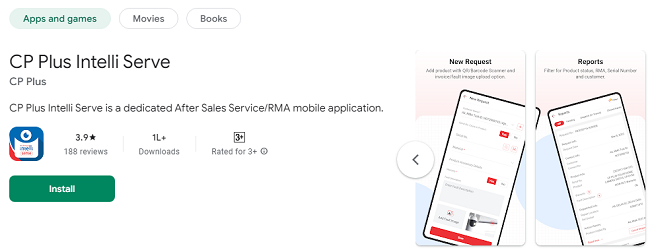
What is the CP Plus Intelli Serve App?CP Plus Intelli Serve is a dedicated after-sales service app designed specifically for CP Plus brand customers. Whether you're an individual user or a business partner, this app allows you to:
Register product defects and service requests quickly and easily
Track the progress of your issues in real time
Enjoy end-to-end call management and updates
The app ensures that you can resolve any problems with your CP Plus security system swiftly and effectively, with a focus on customer satisfaction and a seamless experience.
Features of the CP Plus Intelli Serve App
The CP Plus Intelli Serve app is packed with features that make it easy to access customer support and get solutions quickly. Here are the key features of the app:
1. Simple Product Registration
CP Plus Intelli Serve allows users to register their CP Plus products on the app directly. This is an essential feature as it allows the company to keep track of your devices for warranty purposes and for any required after-sales support.
2. Issue Registration
If you face any issues with your CP Plus product, you can log a service request through the app. Whether it’s a technical problem, a defect, or a query, users can create a ticket and submit it directly to CP Plus for resolution.
3. Real-Time Issue Tracking
Once your issue is logged, the app lets you track the progress in real time. This feature offers complete transparency, so you know exactly where your service request stands in terms of resolution. You can get updates regarding technician visits, part replacement status, and more.
4. End-to-End Call Management
The app offers complete management of your service calls. You can view the status of your requests, interact with the support team, and even close the call once the issue is resolved. The app provides detailed information about each service call, ensuring that nothing is missed.
5. Push Notifications
To ensure you never miss an important update, the app sends push notifications regarding the status of your service requests. You will be notified whenever there is an update, whether it’s about a resolution, technician visit, or a new update related to your issue.
6. Comprehensive Reports and Analytics
CP Plus Intelli Serve helps you keep track of all your service history. You can access reports and data related to your product’s maintenance and issue resolution, allowing you to better understand the health of your security system.
7. Support for Multiple Products
If you own multiple CP Plus products, you can manage all your service requests from a single platform. The app supports the registration and tracking of various devices, ensuring that all your products are covered under a unified service system.
How to Download CP Plus Intelli Serve App?
Now that you know the core features of the CP Plus Intelli Serve App, it’s time to download and start using it. The app is available on both Android and iOS platforms, so no matter what device you use, you can take full advantage of its features.
For Android Users:
Open the Google Play Store on your Android device.
Search for “CP Plus Intelli Serve” in the search bar.
Select the app from the search results.
Tap on the “Install” button to download and install the app.
Once the installation is complete, you can open the app directly from your home screen or app drawer.
For iOS Users:
Open the App Store on your iOS device.
Search for “CP Plus Intelli Serve” using the search bar.
Select the app from the search results.
Tap on the “Get” button to download and install the app.
After the installation, launch the app from your iPhone’s home screen.
How to Set Up and Use the CP Plus Intelli Serve App?
Once you have successfully downloaded the CP Plus Intelli Serve app, it’s time to set it up and start using it. Follow these simple steps:
Step 1: Open the App
After installing the app, tap on the CP Plus Intelli Serve icon to launch it.
Step 2: Register or Log In
If you're a first-time user, you will need to register an account. You’ll be prompted to provide basic details such as your name, email address, and a phone number. You might also be required to provide your CP Plus product details (serial number, model, etc.) during the registration process.
If you're an existing user, simply log in using your credentials.
Step 3: Register Your Product
Once logged in, you’ll be able to register your CP Plus products within the app. This is an essential step for tracking warranty, service requests, and updates. To register a product:
Select “Add Product” from the dashboard.
Enter your product’s serial number and other relevant details.
Submit the information, and your product will be successfully registered.
Step 4: Create a Service Request
If your CP Plus product encounters an issue, it’s time to log a service request. Here’s how:
Tap on “Service Request” from the dashboard.
Select the product that’s causing the issue.
Choose the issue type (technical problem, defective part, etc.).
Describe the problem in detail and attach any images or videos that may help the support team understand the issue.
After submission, your service request will be logged in the system.
Step 5: Track Your Service Request
Once your service request is logged, you can monitor its progress. The app will show the current status of the issue, whether it’s under review, being resolved, or awaiting parts. You’ll also receive push notifications whenever there’s an update.
Step 6: Communication with Support
If you need further clarification or want to update your service request, you can directly communicate with the CP Plus support team through the app. You’ll be able to chat with customer support or request technician visits based on your specific needs.
Step 7: Close the Request
Once the issue is resolved, the app will prompt you to confirm that the issue has been fixed. You can close the service request from the app and provide feedback on your experience. This is a crucial step that helps CP Plus improve its services.
Benefits of Using the CP Plus Intelli Serve App
1. Convenience and Accessibility
With the CP Plus Intelli Serve App, you have the power to manage your product issues anytime, anywhere. The app provides a 24/7 service experience, ensuring that you can access support whenever necessary.
2. Real-Time Updates
Gone are the days of calling customer support for updates. With real-time tracking and push notifications, you’ll always know the status of your service requests.
3. Transparency and Efficiency
The app promotes transparency by allowing you to track the progress of your issue resolution from start to finish. You will know exactly what’s happening with your request, and you can rest assured that your issue is being handled effectively.
4. Enhanced Customer Support
The CP Plus Intelli Serve App offers direct communication with CP Plus’s support team, reducing the wait times and ensuring that your concerns are addressed quickly. Whether you have a query or require technical assistance, the app makes it easy to reach out.
5. Comprehensive Service History
The app keeps track of all your service requests and product history, giving you easy access to records for warranty claims, repairs, and more.
Latest Updates on CP Plus Intelli Serve App
CP Plus is continually improving the Intelli Serve App to provide a better user experience. Here are the most recent updates:
1. Improved User Interface (UI)
The latest version of the CP Plus Intelli Serve app comes with an updated user interface. It features a more intuitive design, making it easier for users to navigate and find what they need, from logging service requests to tracking progress.
2. Faster Service Request Resolution
CP Plus has optimized its service request management system, allowing faster resolution times for issues logged through the app. Service requests are processed more quickly, reducing waiting time for users.
3. Enhanced Push Notifications
The app now offers more personalized push notifications. You can get updates not only on your service requests but also about new product launches, maintenance tips, and important system updates.
4. Improved Communication Channels
In addition to chat support, the app now offers live call support for users who need immediate assistance. This ensures faster response times and more effective troubleshooting.
5. Expanded Product Registration
The app now allows users to register a wider range of CP Plus products, including newly launched models and accessories. This makes it easier for customers to manage all their CP Plus products in one place.
6. Warranty Tracking
The updated app now offers a warranty tracking feature. Users can easily check their product’s warranty status and receive reminders when it’s about to expire.
Frequently Asked Questions (FAQs)
1. How do I download the CP Plus Intelli Serve App?
Android Users: Open the Google Play Store, search for CP Plus Intelli Serve, and tap Install.
iOS Users: Open the App Store, search for CP Plus Intelli Serve, and tap Get to install.
2. Is the CP Plus Intelli Serve App free to use?
Yes, the CP Plus Intelli Serve App is completely free to download and use for CP Plus customers.
3. How do I register a CP Plus product on the app?
Open the app and log in (or create a new account).
From the dashboard, select “Add Product”.
Enter your product’s serial number and model details.
Once you submit, your product will be registered for tracking and warranty purposes.
4. What kind of issues can I report through the CP Plus Intelli Serve App?
You can report a variety of issues, including:
Technical issues with your devices (e.g., camera malfunction, connectivity problems).
Defective parts (e.g., broken cables, damaged hardware).
General queries about your CP Plus product.
5. How do I track the status of my service request?
Once you’ve logged a service request, you can track its progress in real-time from the “Service Requests” section of the app. You’ll get updates about technician visits, parts replacement, and when the issue is resolved.
6. Can I communicate directly with CP Plus support through the app?
Yes, the app allows you to communicate with CP Plus customer support through chat or live calls for immediate assistance. You can also update your service requests or add new details directly through the app.
7. How do I close a service request once the issue is resolved?
Once the issue is resolved, you’ll be prompted to confirm the resolution in the app. After that, you can close the request by selecting “Close Request”. You’ll also be given the option to provide feedback.
8. Will I receive notifications about my service request?
Yes, the app sends push notifications to update you about the status of your service request. Notifications include updates on technician visits, parts availability, and when the issue has been resolved.
9. What should I do if I forgot my login credentials?
If you forget your password, you can reset it by clicking on the “Forgot Password” option on the login screen. You’ll receive a password reset link on your registered email address.
10. Can I use the CP Plus Intelli Serve App for multiple products?
Yes! You can register and manage multiple CP Plus products through the app. Each product can have its own service request and tracking.
11. How do I update my CP Plus Intelli Serve App?
To update the app, go to the Google Play Store or App Store, search for CP Plus Intelli Serve, and tap Update if a new version is available.
12. Is there a warranty tracker feature in the app?
Yes, the latest update of the app includes a warranty tracker, which helps you monitor the warranty status of your CP Plus products and receive reminders before the warranty expires.
13. What if I’m unable to resolve my issue using the app?
If your issue isn’t resolved through the app, you can contact customer support through the in-app chat or live call feature. You can also request a technician to visit for in-person assistance.
14. Can I register a new product after purchasing it?
Yes, you can register a new product at any time after purchase. Simply follow the steps in the “Add Product” section of the app to register your new device.
15. How do I update my contact details in the app?
You can update your personal details (name, email, phone number) in the app by going to Settings and selecting “Edit Profile”.
ConclusionThe CP Plus Intelli Serve App is an invaluable tool for CP Plus users who want to streamline their after-sales service experience. By providing an easy way to register service requests, track progress, and communicate directly with the support team, this app ensures that users can keep their CP Plus products in top condition with minimal hassle.
Downloading and using the CP Plus Intelli Serve App is simple and straightforward, and the numerous features and benefits make it a must-have for every CP Plus customer. Whether you’re dealing with a technical issue, need support with a product defect, or just want to track the status of your service request, this app is your go-to solution for fast, reliable service management.
If you haven't yet downloaded the app, go ahead and install it on your Android or iOS device today and experience the convenience and transparency that comes with having CP Plus Intelli Serve at your fingertips!
Updates